
Articles & news
Tips, news and guides about SharePoint, Microsoft Teams and Office 365.

New in Microsoft Teams and SharePoint since last time: June 2026
The latest updates since the previous June roundup: a cleaner SharePoint interface, Teams Phone Agent, and Microsoft 365 business apps built on SharePoint.

What's new in Microsoft Teams and SharePoint: June 2026
The June update for Microsoft Teams and SharePoint covers SharePoint Admin Agent, faster Teams performance, Wi-Fi workplace check-in, and new Teams agent features.

What's New in SharePoint: May 2026
SharePoint in May 2026 is mainly about AI Skills entering public preview. The feature makes it easier to save rules, working methods, and reusable outputs directly at site level.
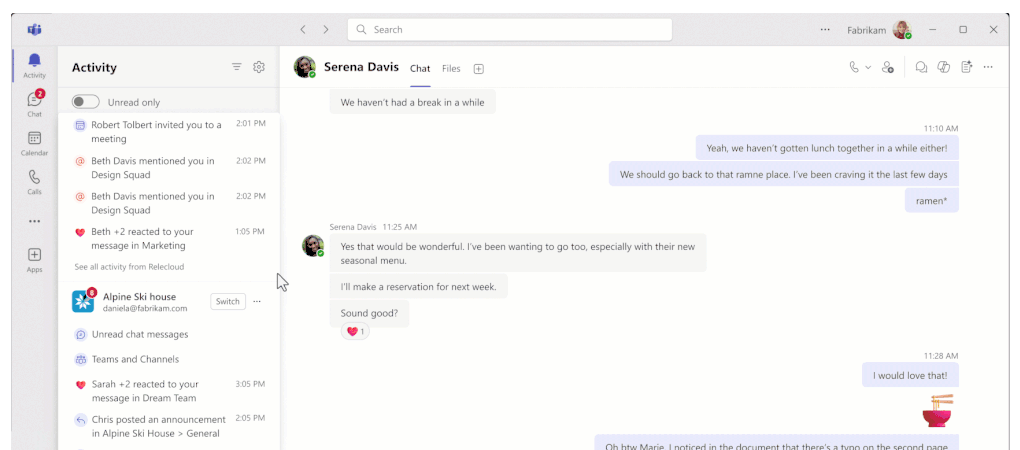
What's New in Microsoft Teams: May 2026
Teams in May 2026 adds stronger support for calling, frontline work, and information protection. The month also brings smaller improvements that make chats, meetings, and admin work more practical.

What's New in Microsoft Teams and SharePoint: April 2026
Teams March 2026 adds multi-account and multi-org activity, automatic EXIF metadata removal from shared images, and a redesigned AI-powered Workflows app. A Copilot license is required for AI workflows.

What's New in Microsoft Teams and SharePoint: March 2026
Latest Microsoft Teams and SharePoint updates. AI-powered building in SharePoint, new VDI optimization for Teams, and February's Teams feature roundup.

What's New in Microsoft Teams and SharePoint: February 2026
SharePoint gets new Workflows, Quick Steps and built-in approvals to simplify business process automation. Teams launches Frontline Agent, a new events experience and Communities from Viva Engage.

What’s New in Microsoft Teams in December 2025 – Enhancements for Collaboration, Security, and Telephony
Discover What’s New in Microsoft Teams in December 2025: Open Chat, Calls, Calendar, and Activity in Separate Windows for Smoother Parallel Work, Better Collaboration, and Enhanced Security and Telephony Updates.

Immersive Events in Microsoft Teams Are Generally Available
Microsoft Launches Immersive Events in Teams: Plan, Build, and Run 3D Meetings and Large-Scale Events Directly in Teams on PC, Mac, and Meta Quest. A New Way to Engage Participants with Interactive Experiences.

New in Microsoft Teams from Ignite 2025 – focus on collaboration, meetings, and security
Discover what's new in Microsoft Teams from Ignite 2025: a unified Copilot and agents in chats, channels, and meetings (preview), with contextual awareness, improved collaboration, smarter meetings, and enhanced security.

SharePoint at Ignite 2025: What’s new for SharePoint and Teams
Discover the latest news from Ignite 2025 for SharePoint and Teams. Microsoft 365 Copilot now understands more of SharePoint’s content and structure—including metadata in document libraries—for improved results.

create SharePoint pages directly in Microsoft 365 Copilot
Discover the new feature: create and publish SharePoint pages directly in Microsoft 365 Copilot. Write in natural language in Copilot Chat and produce finished pages faster, more smoothly, and more consistently for your team.

Teams becomes faster and more reliable: focus on performance, memory, and experience
The new Teams 2025 is faster and more reliable on Windows, Mac, and mobile. Performance and memory have been optimized—especially for video—resulting in quicker startup, smoother meetings, and a better, more responsive experience.
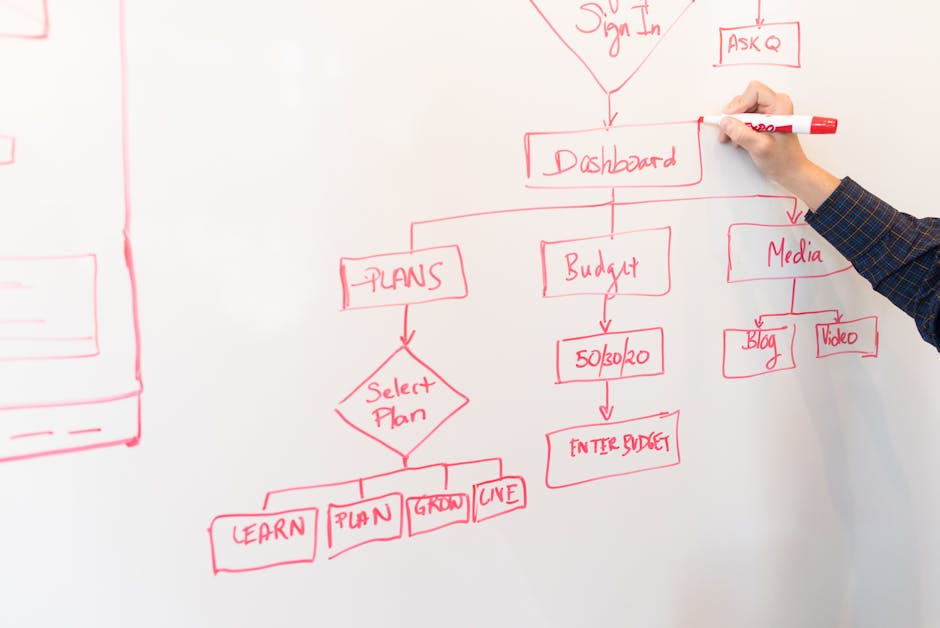
updates in the SharePoint library: new UX, AI features, and data collection forms
Discover the new UX in SharePoint libraries: simpler navigation, clearer views, and faster workflows. AI features and collection forms streamline management, save time, and enhance collaboration and control.

New in Microsoft Teams October 2025 – focus on collaboration and meeting rooms
Discover what's new in Microsoft Teams in October 2025: Microsoft 365 Copilot summarizes shared Word files in 1:1 and group chats, including on mobile. Get a quick overview without opening the document for more efficient collaboration.

SharePoint + Teams: metadata and Knowledge Agent enhance Copilot responses
Discover how the Knowledge Agent in SharePoint enhances metadata understanding and elevates Copilot responses. According to Microsoft’s roadmap, Microsoft 365 Copilot will gain expanded metadata handling for file references.
SharePoint showcase: governance and security in the AI era – what’s new for SharePoint and Teams
Discover new tools in SharePoint and Teams for governance, transparency, and content hygiene. Learn how this secures permissions and governs how Copilot and agents find, interpret, and use corporate data.

Microsoft discontinues the Lists mobile apps – impact on SharePoint and Teams
Microsoft is discontinuing Microsoft Lists for iOS and Android. New installations will be blocked in September 2025, and the app will stop functioning in November 2025. The impact on SharePoint and Teams is explained, as well as alternatives.

AI agents in Teams and new integrations with SharePoint
Discover how Microsoft is elevating collaboration in Teams with AI agents for meetings, channels, and Viva Engage. They summarize, answer questions, and suggest next steps, integrated with new connectors to SharePoint.
The Power BI feature “visualize the list/library” is being removed from SharePoint
Microsoft is discontinuing the Power BI integration in SharePoint lists and libraries. As of November 11, 2025, you will no longer be able to visualize lists/libraries directly. Read about what is changing, the impact, and available alternatives.
Knowledge Agent in SharePoint: AI that makes content more useful in Copilot and Teams
Microsoft launches Knowledge Agent in SharePoint (Public Preview). AI structures and enhances content, provides Copilot with better context, and makes knowledge easier to find and use in Teams and workflows.

News in Microsoft Teams and SharePoint – August 2025
Discover the latest features in Microsoft Teams and SharePoint from August 2025. This article summarizes improvements such as simplified search and other updates that streamline your workflow.
New blog series about SharePoint: focus on agents and new opportunities in Teams
Discover SharePoint Showcase – Microsoft’s new blog series that explores the latest innovations in SharePoint and Teams, with a focus on AI-powered agents and how they are creating new opportunities for businesses.

New template gallery in SharePoint simplifies page management
Discover Microsoft’s new template gallery in SharePoint! Now, organizations can easily create attractive and informative pages and news posts without starting from scratch. Simplify page management today!

New improvements for header and footer in SharePoint – more flexibility and simpler design
Discover Microsoft’s latest update for SharePoint! As a site owner or user, you now have access to a more modern, flexible interface with enhanced options for designing the header and footer.
New AI-powered sections in SharePoint – smoother content creation for Teams and intranet
Discover Microsoft’s new “Sections with AI” in SharePoint! Create and organize content more efficiently for Teams and intranets with AI support. Streamline your workflow and enhance collaboration with ease.

New Features in Microsoft Teams and SharePoint – July 2025
Discover the latest updates in Microsoft Teams and SharePoint from July 2025. Read about new features and improvements that streamline digital collaboration and workflows in your workplace.
New status panel in SharePoint: easier overview for document translation and autofill
Discover SharePoint’s new status panel, which provides a clear overview for document translation and autofill. Streamline your workflow, save time, and get quicker insights into column status and translation processes.

Encryption in Microsoft Teams and SharePoint – what are the current regulations?
Microsoft has updated how encryption works in Teams, which affects storage and collaboration in SharePoint and OneDrive. Read about the current requirements for security, data management, and new guidelines.

SharePoint Alerts are being phased out – what does this mean for you as a Microsoft 365 user?
Microsoft is phasing out SharePoint Alerts this year. This article explains how this will affect users working in Microsoft 365, what alternatives are available, and how you can best adapt to the change.

New feature for sign language in Microsoft Teams
Microsoft Teams is now introducing Sign Language Mode, a new feature that makes it easier for deaf and hard-of-hearing users, as well as interpreters, to participate in meetings. The focus is on increased accessibility.
Major improvements for private channels in Microsoft Teams and SharePoint
Microsoft is launching major improvements for private channels in Teams and SharePoint. The updates enhance collaboration and increase security when handling sensitive information within organizations.

New Features in Microsoft Teams and SharePoint: Focus on More Efficient Collaboration
Discover the latest updates in Microsoft Teams and SharePoint that simplify and enhance collaboration. New features provide smoother workflows for both small teams and large organizations.
Latest News in Microsoft Teams – June 2025
Discover the latest updates in Microsoft Teams and SharePoint for June 2025! New features enhance collaboration, administration, and user-friendliness for both teams and organizations.

New overview for Teams client health – stay informed before issues arise
Microsoft launches Teams Client Health in the Teams Admin Center – a new overview for administrators and IT support. Get a consolidated view of the Teams client’s status and identify issues before they arise.

New FAQ web part in SharePoint – now with Copilot support
Microsoft is launching a new FAQ web part in SharePoint with Copilot support. This feature makes it easier for content managers to create, edit, and manage questions and answers directly on the company intranet.

Popular SharePoint Solutions from Third-Party Vendors – May 2025
Discover the most popular third-party solutions for SharePoint in May 2025. Read about statistics, trends, and how these apps enhance functionality in SharePoint and Teams according to Microsoft’s latest data.

New feature: e-signing directly in Microsoft Word via SharePoint
Microsoft launches e-signing directly in Word via SharePoint. Request and manage electronic signatures smoothly without leaving the document. Save time and streamline your signing process.

Teams Free replaces Skype – what does this mean for you as a user of Microsoft Teams and SharePoint?
Skype is being discontinued and replaced by Teams Free. The article explains how you can easily transfer chats, contacts, and call history to Teams, as well as the benefits this brings for Teams and SharePoint users.

New experience in Microsoft Teams – improved performance in chats and channels
Microsoft launched a new Teams experience in May 2025, featuring faster, more efficient chats and channels. The improvements enable smoother collaboration and increased productivity for all types of workgroups.

New features in Microsoft Teams – focus on collaboration and meetings
Discover the latest features in Microsoft Teams from May! This article summarizes new tools for more effective collaboration, an improved user experience, and smarter meetings. Stay updated here.

SharePoint and Teams in the AI Era: Key News Spring 2025
Discover the latest updates in SharePoint and Teams in spring 2025. Learn how new AI-powered features are transforming collaboration, automation, and content management within organizations.

New integration between Agreements and Microsoft 365 Copilot Tuning – more efficient contract management in Teams and SharePoint
Discover how the new integration between Agreements and Microsoft 365 Copilot Tuning simplifies and streamlines contract management in Teams and SharePoint through AI support, automation, and smart features.
Microsoft Teams receives high marks for audio quality – what does that mean for your organization?
Microsoft Teams receives top marks for audio quality in a new independent study. Read about what this means for your organization's digital collaboration and how improved audio can enhance communication in meetings.
New Features in Microsoft Teams: May 2025
Discover the latest features in Microsoft Teams from May 2025! We summarize the updates that enhance collaboration and information sharing within Microsoft 365, as presented at Microsoft Build 2025.
SharePoint Embedded – New Opportunities for AI and Collaboration in Microsoft 365
Discover the new SharePoint Embedded in Microsoft 365! Build AI-powered enterprise solutions with enhanced collaboration, intelligent content management, and innovative features from this year’s Build conference.
New dashboard web part in SharePoint and Teams
Discover Microsoft’s new dashboard web part for SharePoint and Teams! Gather, display, and organize important information efficiently. Simplify collaboration and increase productivity in your organization.

News in Microsoft Teams and SharePoint – April 2025
Discover the latest updates in Microsoft Teams and SharePoint for April 2025. Improvements to workflows, collaboration, and meetings help businesses work smarter and more efficiently.

Viva Connections cards now available directly in SharePoint and Teams
Discover how Microsoft’s update of Viva Connections cards in SharePoint and Teams simplifies information management and quick actions. Optimize your work with new, integrated capabilities.

News in Microsoft Teams and SharePoint: Updates from Enterprise Connect 2025
Discover the latest news in Microsoft Teams and SharePoint from Enterprise Connect 2025. This article summarizes new features, improvements, and trends for effective digital collaboration in the workplace.

New Preview Feature in SharePoint Pages and News
Microsoft is launching a new preview feature for SharePoint pages and news. Users can now easily see how the content will appear before publishing, which enhances the editing process.

News in SharePoint and Microsoft Teams: March 2025
Discover the latest updates for SharePoint and Microsoft Teams in March 2025. Learn how new features, including page creation with Copilot, can enhance your workflow and collaborations.

SharePoint Hackathon 2025: Creative Solutions and Winners
Discover the winners of the SharePoint Hackathon 2025, where creative solutions in SharePoint and Microsoft Teams are showcased. Be inspired by these groundbreaking innovations and the technology of the future!

Create pages with Copilot in SharePoint
Explore how you can use the new Copilot feature in SharePoint to easily create pages. With the help of generative AI and Microsoft Graph, page building becomes faster and smoother than ever before.

New integration between SharePoint and Microsoft Teams
Explore Microsoft's new integration between SharePoint and the Teams Approvals app. Streamline approval processes in lists and libraries with easy setup. Enhance collaboration and productivity!

Improved Work Environment with Flexible Teams Layouts
Discover how Microsoft Teams enhances the work environment with new flexible layouts. The latest update offers customizable features to increase efficiency and flexibility in digital workspaces.

News in Microsoft Teams and SharePoint
Discover the latest updates in Microsoft Teams and SharePoint from Enterprise Connect 2025. Enhance your hybrid work environment with new features for effective collaboration and seamless communication.

New Pricing Model for SharePoint Agents
Discover Microsoft's new consumption-based pricing model for SharePoint agents. Perfect for organizations already using or considering SharePoint. Streamline costs and optimize usage now!

Weekly meetings for frontline Teams users
Explore Microsoft's new initiative for frontline Teams users. Participate in weekly meetings to discuss challenges, receive guidance, and optimize your Teams work. Perfect for empowering your team!

Updates from the SharePoint Roadmap Pitstop for February 2025
In the SharePoint Roadmap Pitstop for February 2025, new features and improvements for SharePoint and Microsoft Teams are presented. Learn about the latest updates and how they can enhance your workflow.

New chat and channel experience in Microsoft Teams
Microsoft Teams is launching an updated chat and channel experience in March. The goal is to facilitate modern collaboration with enhanced features for smoother communication and increased productivity.

News in Microsoft Teams for February 2025
Discover the latest updates in Microsoft Teams for February 2025. Enhanced features for SharePoint users and new tools that streamline your workday. Learn more about these exciting developments!

SharePoint Agents and Their Practical Applications
Discover how SharePoint agents can optimize your workflows in the latest episode of "The Intrazone." Learn about their practical applications and how they can streamline processes for improved productivity.

SharePoint and Microsoft Teams Hackathon
In March 2025, a hackathon focused on SharePoint and Microsoft Teams will be held. Participants will have the opportunity to develop innovative solutions using AI and explore SharePoint's new features. Discover the future of collaboration!

News in SharePoint and Microsoft Teams: Flexible Sections
Microsoft has launched an update for SharePoint, now featuring flexible sections, allowing the creation of dynamic pages without previous limitations. Discover new features for Teams and SharePoint!

Accessibility Assistant for SharePoint Pages: A New Feature from Microsoft
Microsoft introduces an Accessibility Assistant for SharePoint, which helps content creators ensure in real time that their pages are accessible to all users. Improve accessibility with ease!

Improve the quality and reliability of Teams calls
Optimize Teams calls with Microsoft's new Admin Center feature. Improve audio and video quality and reliability for smoother communication. Ideal for IT administrators who want to ensure the best possible collaboration.

Improved video quality in Teams with Super Resolution
Discover how Microsoft Teams is revolutionizing video meetings with Super Resolution. Improved video quality despite weak networks provides a sharper and more reliable experience in your virtual meetings.

What's new in Microsoft Teams: January 2025
Discover the latest Microsoft Teams updates for January 2025. Save time and improve communication with new features that simplify collaboration. Learn about changes that can improve your work.

New from Microsoft: Editorial Card Web Part for SharePoint
Microsoft Launches Editorial Card Web Part for SharePoint! Enhance the look and functionality of your SharePoint pages with this new feature that provides a more engaging and visually appealing experience.

New features in Microsoft Lists and what they mean for SharePoint and Teams
Discover the latest updates to Microsoft Lists and their impact on SharePoint and Teams. Improvements that streamline business collaborations and processes. Learn more about these important changes!

Updates in SharePoint and Teams: An Overview for January 2025
What's new and new in SharePoint and Teams. For example, improved integrations, user experiences, and security enhancements.

Discover the new carousel layout for SharePoint and Microsoft Teams
Microsoft has updated SharePoint Online with a new carousel layout for the Hero web part. This enhancement aims to give SharePoint pages and news a visual boost and increased ease of use.

New calendar in Microsoft Teams now available
Microsoft Teams now has an updated calendar for commercial customers. The new calendar offers a unified and modern design that enhances the user experience and streamlines scheduling and collaboration.

Discover SharePoint and Microsoft Teams at New Microsoft Event
Attend Microsoft's digital event on January 29, 2025, from 6:00 p.m. to 7:00 p.m., and discover news and insights about SharePoint and Microsoft Teams. A must for anyone who wants to stay up to date within Microsoft tools!

SharePoint Agents in Practice
Explore how SharePoint agents streamline workflows in the latest episode of The Intrazone podcast. Learn how AI technology can automate and improve teamwork and productivity in your workplace.

New SharePoint and Teams Features: December 2024 Updates
Discover the latest updates in SharePoint and Teams from December 2024. Microsoft is introducing new features that streamline collaboration and enhance the user experience. Read about the news here!

What's New in Microsoft Teams and SharePoint: December 2024
Discover the latest Microsoft Teams and SharePoint updates for December 2024. Enhance your workday with new features for meetings, webinars, and collaboration. Don't miss out on these essential tools!

New translation feature in SharePoint and OneDrive
Discover Microsoft's new translation feature in SharePoint and OneDrive. Now you can easily translate documents into multiple languages directly in the platforms, facilitating global collaboration and efficiency.

Podtip: Workplace efficiency with SharePoint and Microsoft Teams
Explore how SharePoint and Microsoft Teams can increase workplace efficiency in the AI era. Michelle Caldwell, CEO of Synozur, shares insights in the podcast “The Intrazone.” Efficiency for the future!

Improved accessibility in Microsoft Teams
Microsoft Teams is committed to improving accessibility for all users. Through new features and customizations, Microsoft is creating an inclusive and user-friendly platform that fosters collaboration and inclusion.

AI-Powered Workplaces: What's New in SharePoint and Microsoft Teams
AI-powered updates in SharePoint and Teams from Microsoft are revolutionizing flexible workplaces. Technology improves collaboration and efficiency, regardless of location. Discover the workplace of the future here!

Enhance SharePoint with a well-thought-out information architecture
Streamline SharePoint with smart information architecture. Learn how to organize and structure data to improve collaboration and productivity.

Support for external cameras in Microsoft Teams on iPad
Microsoft Teams on iPad now supports external cameras, improving the video conferencing experience. Ideal for users who desire high-quality video in their meetings. Discover the benefits of this update!
Office 365 news - Preview and summarize files directly in Teams
New features make it easier to manage files in Teams, block unwanted users, connect Teams to the intranet, and enable approval flows in SharePoint.
Office 365 news - Easy navigation in Teams when all chats are in one place
Teams brings together chats and channels in one view for easier navigation. SharePoint introduces AI-powered design ideas and Copilot to enhance your texts, while Copilot in OneDrive helps summarize documents, compare files, and answer complex questions based on content.
Office 365 News - SharePoint Home, New Way to Manage Pages
News in Office 365: The new SharePoint home page simplifies page management, Teams customizes the video image according to the number of participants in the room, and Outlook now sorts the way you want...

All in one place - now you will always find your way back to your SharePoint pages
Soon it will be much easier to find your way back to all the SharePoint pages you've created or worked on, no matter where they're located. Use SharePoint Home as a tool for managing your SharePoint pages
3 anledningar att byta till nya Outlook
Follow in Outlook and stay up to date
With the new OSA option “Follow” in Outlook, you can effectively keep track of meetings and stay informed even if you can't attend yourself
Office 365 news - Use the graphical profile even on the intranet
With the latest updates in Office 365, you can now easily choose to show or hide the header on information pages and turn your SharePoint intranet into a communications hub with your unique graphical profile, giving you total control over the look and feel of your page.

New in SharePoint: use your own fonts!
Make your digital workspace more personal and unified with SharePoint Brand Center. Now you can customize SharePoint with your own fonts, strengthen your brand, and create a unified communications profile.

🚀 Letter to the Management Team: Why Intranet in SharePoint and Structure in Teams?
In an increasingly digitized work environment, many companies face the challenge of keeping information and communication efficient and accessible - a well-structured intranet means you can quickly refer employees to the right information on the intranet, eliminating the need to build solutions from scratch and dramatically reducing the inflow of email.

Challenges of Creating a SharePoint Intranet Without Experience
Building an intranet in SharePoint without prior experience can involve several risks and challenges that can affect both the time spent and the quality of the end result.
Office 365 Updates - Both SharePoint and Teams Get a Refresh
Both SharePoint and Teams are innovating and introducing several new capabilities and features, such as co-authoring in SharePoint and the ability to rename all channels in Teams

7 mistakes you don't want to make in Microsoft Teams
Avoid confusion and increase efficiency in Teams by avoiding pitfalls such as duplicate teams, unclear team names, and excessive use of notifications. Read our tips on what to avoid and how to do instead.

GDPR Compliance: Action List for Future-Proofing Your Business
Although GDPR is not talked about much anymore, it is an EU law that it is important to comply with. Take the help of our checklist to protect personal data effectively and avoid fines.
Office 365 news - Is there a difference between Copilot and Copilot?
Do you know what's the difference between Copilot and Copilot? Did you know that you can archive channels in Teams? And, have you tried the new Discover flow in Teams?

5 Reasons Why an Intranet is Important for Small Growing Businesses
For small growing businesses, the intranet is much more than just an internal website; it is a critical component that contributes to the company's success and growth. Investing in a digital workplace that is easy to maintain and update is not only a smart business strategy, but also a necessity.

Choose the Right Copilot: Guide to Microsoft's AI Assistants
Explore different Copilot versions for Microsoft users: Copilot for Microsoft 365 for business, Pro for personal use, in Windows for seamless integration, and in Edge for innovative browsing. Find the right AI assistant for your needs.
Everything you need to know about the new Planner app in Teams
Discover Microsoft's new Planner app in Teams. With fast, intuitive features and advanced collaboration tools, it offers an all-in-one solution to streamline your work. Perfect for the modern workplace.

Forget everything you thought about building a new Intranet in SharePoint
Discovering a new way to create an intranet in SharePoint with ready-made content from Cognit - save time and money.

Archive, delete, or hide — how to manage inactive teams and channels
What do you do with materials in completed Teams projects? Learn to hide, archive or delete to keep your digital workspace clean and organized

New Teams gallery gives you the full picture
Discover the new meeting gallery in Microsoft Teams! Learn more about the latest features with customizable viewing options and seamless integration of video and audio
New default theme in Office - what does it mean?
Discover Office's new default theme — a fresh and modern theme with a new font, updated colors and clear color contrasts.
Guide: Choose the right type of meeting in Teams
Become an expert in choosing the right Microsoft Teams meeting for your needs. From big to small — we give you a simple guide to help you streamline your digital gatherings.
.jpg)
5 tips för en bättre bakgrund i Teams
Nu behöver du inte sätta upp skärmar för att dölja vad som pågår i bakgrunden under Teamsmötet - ställ in bakgrundseffekter så kan du byta ut kontoret mot en helt annan miljö.
Office 365 nyheter - Teams förändras och SharePoint förenklar kommunikationen
Utforska den nya versionen av Teams för bättre prestanda och möjlighet att hantera flera organisationer samtidigt och nå ut till alla med specialdesignade mallar i SharePoint skapade för e-post
Nå alla med SharePoint-nyheter skapade för e-post
Upptäck hur SharePoint News integrerat i Outlook kan effektivisera ditt nyhetsutskick. Med sex nya e-postoptimerade mallar, anpassade för maximal påverkan och läsbarhet, kan du nu skicka fullständiga nyhetsbrev direkt till dina medarbetares inkorgar.

Kom igång med Nya Teams
Har du provat nya Teams? Den nya versionen erbjuder förbättrad prestanda, skalbarhet och spännande nya funktioner - från att vara inloggad i flera organisationer samtidigt till integration med Microsoft 365-appar och en förbättrad sökfunktion. Läs mer om hur Nya Teams kan revolutionera din arbetsdag.
Microsoft Copilot - The parts Microsoft salespeople don't really want to talk about
Microsoft Copilot, an AI assistant from Microsoft and OpenAI, can revolutionize the workplace, but also brings potential risks and challenges. Read more.

Nya OneDrive - Filhantering och samarbete har aldrig varit enklare
Har du sett att OneDrive håller på att få en ordentlig uppfräschning? Vi tar en titt på de nya funktionerna i OneDrive och ser hur de kan hjälpa dig att bli mer effektiv.

Introducerar: AmpliFlow - Vår allt-i-ett-lösning för ISO-certifiering och ledningssystem
Introduktion av AmpliFlow - Cognits plattform som effektiviserar processen för ISO-certifiering och ledningssystem. Med expertstöd och smarta IT-verktyg tar vi ditt företag till nästa nivå. Läs mer!
Office 365 nyheter - Ta hjälp av AI för att bli mer effektiv på jobbet
Läs om att du kan ta hjälp av AI för att bli mer effektiv på jobbet, att kanalchatten i Teams byter håll, att du kan göra om dina Wikis till OneNote-anteckningar och hitta till dina OneDrive-dokument direkt i Teams.

SharePoint Copilot: AI Comes to Intranets and SharePoint
SharePoint Copilot, an AI-driven innovation, is revolutionizing content creation on intranets and SharePoint. Taking full advantage of its potential requires a well-thought-out structure, policy and training that ensures effective internal communication and avoids information overflow.

Order: The Secret (and Action Plan) for Successful Businesses
How do I create a document management that increases productivity, facilitates decision-making, ensures compliance, improves communication and collaboration, and strengthens the corporate culture?
Office 365 nyheter - December 2022
Läs om den nya startsidan för intranätet, hur du kan ha Teamsmöte med vem som helst och att du kan använda sökhistoriken till att förbättra intranätet.

Office 365 nyheter - Höst 2022
Lär dig hur du schemalägger chattmeddelanden så att de inte stör utanför arbetstid och få hjälp med att hitta och åtgärda dubbletter i Outlook

10 anledningar att byta ut filservern mot Microsoft 365 och SharePoint
Har du svårt att se fördelarna med att gå ifrån en traditionell filserver till ett molnbaserat samarbetssystem som Microsoft 365? Vi ger dig 10 viktiga anledningar att flytta till molnet

What you need to know when starting an intranet project
We'll go through what you need to consider when starting an intranet project - to build a new intranet or redo an existing one
Office 365 nyheter - Sommar 2022
Nu kan du spela upp en video direkt i Hero-webbdelen och öppna och kommentera i pdf-filer direkt i Teams. Läs om det och andra nya funktioner i SharePoint, Teams och Outlook.
Ställ in Adobe Acrobat som standard-app för pdf-filer i Teams
Ställ in Adobe Acrobat som standard-app för att visa och redigera pdf-filer i Teams så öppnas filerna direkt i Acrobat ifrån Teams och du kan kommentera direkt utan att ladda ner dokumentet

Nu kan du äntligen dela en enskild kanal, utan att behöva dela hela teamet
Nu kan du skapa en särskild kanal i ett Team och bjuda in valfria personer (både kollegor och samarbetspartners) till den där enda kanalen och du behöver inte bjuda in dem till teamet.
Office 365 nyheter - Maj 2022
Nytt för maj är till exempel att du kan använda filter för att förbättra bildkvaliteten och svara snabbt med föreslagna svar i Teams. Läs om det och andra nya funktioner i SharePoint, Teams, Lists och Stream.
Office 365 nyheter - April 2022
Använder du presentatörsläget i Teamsmöten? Har du testat att ha din videobild till vänster om innehållet när du presenterar? Läs om detta och andra nya smarta funktioner i Teams och SharePoint
Office 365 nyheter - Mars 2022
Läs om nya smarta funktioner i Teams, SharePoint och Power Point - som att du nu kan skapa egna automatiska händelser i Teams, spela in video i Power Point och dela bara en kanal i Teams.

Don't see yourself without turning off the camera in Teams
Do you wish you didn't see yourself during the meeting? Now you can choose to hide your own image just for yourself. Or pin it so that your video is the same size as everyone else's and doesn't obscure anyone else
Office 365 nyheter - februari 2022
Läs om nya smarta funktioner i bland annat Teams och SharePoint; Se vilka Teams en användare är med i, skicka delningsinbjudan direkt i Forms och få koll på vad som händer med mötesinspelningar när bäst före-datumet gått ut

Se vilka Teams användaren är med i
Nu finns det en flik i Teams admin-center där du kan se vilka Teams en användare är med i och snabbt göra de förändringar som krävs
Office 365 nyheter - januari 2022
Fäst chattmeddelanden i Teams för att de ska hittas enkelt, använd telefonen som Walkie-Talkie och nya inställningar för att slippa bli störd av notifieringar är några av nyheterna i månadens nyhetssammanfattning
.jpg)
Användarkonton i O365 - 5 saker att hantera vid upphörande av anställning
När en anställning upphör så uppstår ofta frågor om hur man ska hantera konton, epost och ägarskap. Vi går igenom de 5 viktigaste sakerna du behöver hantera kring detta.
Office 365 nyheter - december 2021
Nu kommer möjligheten att dölja eller fästa din egen video under Teamsmötet, du kan också aktivera ljudet tillfälligt genom att hålla ner ett par tangenter när du vill säga något. Läs också om Forms som nu blir mer mobilvänligt
Office 365 nyheter - november 2021
Microsoft har öppnat sina svenska datacenter men visste du att du måste begära migrering för att ditt företags data ska flyttas till Sverige? Läs också om den nya delningsupplevelsen och att du snart kan chatta med "vem som helst" i Teams.
.jpg)
Behåll din data i Sverige
Nya svenska datacenter gör det möjligt för svenska företag att behålla sin data i Sverige men du måste begära flytt senast 31 maj 2022 om du vill ta hem din data - så här gör du

Guide - Kom igång med Viva Connections
Microsoft Viva Connections knyter ihop intranätet och Teams och fungerar både i datorn och i mobilen - konfigurera, aktivera och distribuera Viva Connections-appen direkt från Teams App Store
Office 365 nyheter - oktober 2021
Med nya Viva Connections är det enkelt att koppla ihop intranätet och Teams - det innebär att alla medarbetare kan få tillgång till intranätet och det fungerar både på datorn och i mobil

Öppna dokumentet direkt i Word
Hur vill du helst öppna dina Office-filer i Teams - direkt i Teams, i Skrivbords-appen eller i Online-appen? Bestäm hur du vill att filerna ska öppnas när du klickar på dem i Teams.
Office 365 nyheter - september 2021
Textwebbdelen i SharePoint har uppgraderats, nu kan du lägga in bilder och få texten att flöda runt bilden. Du kan också koppla en hub till en annan hub i SharePoint, svara på specifika chattmeddelanden i Teams och spela upp video i högre hastighet.
Office 365 nyheter - juli/aug 2021
Skapa hopfällbara avsnitt i SharePoint, underhåll intranätet utan att lämna Teams och välj mellan flera olika presentatörslägen när du delar innehåll på mötet. Snart kommer du också kunna ändra namn på kanalerna i Teams utan att orsaka namnkaos i SharePoint.
Office 365 nyheter - juni 2021
Windows 11 är på gång och Microsoft visar upp en förhandsversion av det nya operativsystemet. Läs också om att dela filer i Teams och att skapa uppgifter centralt och publicera dem till hela organisationen.

Att dela eller inte dela
När du skickar ett mail med filer i Outlook får du frågan om du vill skicka som en bifogad fil eller om du vill skicka en delningslänk. Vi reder ut när du ska dela och när du inte ska dela dokument.

Office 365 nyheter - maj 2021
Nytt inom Office 365 den här månaden är bland annat Migration Manager för moln-till-moln migrering av filer, nytt fönster för att dela innehåll i Teams, rekommenderade filer i Office-programmen och att i mobilen kan du navigera i pdf-filer med hjälp av innehållsförteckningen
Bli en mästare på notifieringar i Teams
Får du massor med notifieringar i Teams men inte från de kanaler som du är intresserad av? Eller känner du att du missar saker för att du inte fått meddelande om det? Vi visar hur du blir en mästare på notifieringar.
.jpeg)
Office 365 nyheter - april 2021
Använd bakgrundsbild i Teamsmötet även i mobilen. Precis som på datorn är det enkelt att ladda upp och använda dina egna bilder. Läs också om offlinefiler i mobilen, lägga på webbplatsmallar på befintliga SharePoint-siter och skapa uppgifter direkt från inlägg i Teams
.jpeg)
Office 365 nyheter - mars 2021
Nu kan du komma åt och använda all information i intranätet direkt i Teams genom att aktivera Viva Connections. Läs också om statistikverktyget i SharePoint och nya presentationslägen i Teams med mera
Office 365 nyheter - februari 2021
Läs om Microsoft Viva Topics, Connections, Learning och Insights. De nya verktygen för att öka medarbetarnas engagemang, välbefinnande och möjlighet att upptäcka ny kunskap i det dagliga arbetet.
.jpeg)
Office 365 nyheter - januari 2021
Flera av nyheterna den här månaden handlar om att ge tillgång till samma funktioner oavsett plattform. Att kunna använda Microsoft Lists både om du sitter vid datorn och om du använder mobilen till exempel. Läs också om att dela video med ljud i ett teamsmöte både på Mac och i Windows och att kunna använda Tillsammansläget även i Teams Online.
Office 365 nyheter - december 2020
Läs om den nya appen för Kanalkalender, att PowerPoint öppnas i presentatörsvy i Teamsmöten, att du kan skapa personliga snabblänkar i SharePoint, formatera texten i dina formulär och reagera visuellt i Teams.
Office 365 nyheter - november 2020
Blir det kanske ett digitalt julfirande i år nu när Microsoft utökar Teams for-home till att fungera även i desktop-appen? Läs också om den nya tjänsten Microsoft Productivity Score, att det finns nya layoutalternativ för rubriken och en ny webbpart i SharePoint med mera
.jpeg)
Office 365 nyheter - oktober 2020
Snart kan du ansluta till Teamsmötet i mobilen och överföra det till datorn när du kommer fram till din arbetsplats. Läs också om en ny webpart för organisationsschema i SharePoint, ny designhjälp i Word och att du kan skapa Visiodiagram direkt i Excel - utan att ha Visio-licens.

Office 365 nyheter - september 2020
Breakout rooms, fler scener till tillsammansläget och SharePoint home-site i Teams är bara några exempel på allt som är på gång i Office 365. Många nya funktioner har redan rullats ut - har du provat Stort galleri i ett Teamsmöte eller skapat en privat filtreringsvy i Excel?

Office 365 nyheter juli-augusti 2020
Det händer mycket inom Office 365 - har du t ex sett tillsammansläget i Teams, att man kan flytta delade filer och att Forms kommer till mobilen?

5 smarta tips i Teams, genvägar till en enklare vardag
Smarta tips för dig som börjat använda Teams och vill lära dig lite mer om hur du blir mer effektiv i vardagen med Teams.

Office 365 nyheter - juni 2020
Läs om Large Gallery-vyn i Teams där du kommer kunna se upp till 49 deltagare samtidigt, ändrad gräns för filuppladdning och om att använda Teams även privat

Office 365 nyheter - maj 2020
Har du sett att det går ha flera fönster öppna i Teams och att du kan skapa egna mallar för nya Team? Och att det kommer en ny app för listor där du kan skapa en lista från ett Excelblad? Läs också om att schemalägga publicering och anpassa sidfoten i SharePoint med mera.

Office 365 nyheter - april 2020
Aktuellt i Office är bland annat att det går att ta bort filer även om någon råkar ha filen öppen, du kan komma åt versionshistoriken direkt ifrån filhanteraren och du kan hålla din PowerPoint-presentation uppdaterad även under pågående presentation. Dessutom -har du sett att det går att byta bakgrundsbild i Teams?

Office 365 nyheter - mars 2020
Just nu handlar många av nyheterna om att arbeta effektivt på distans. Läs bland annat om att räcka upp handen för att få ordet i ett Teamsmöte, öppna flera fönster i Teams och att använda wiki-länkar för att snabbt länka upp informationen

How to avoid the mistakes companies make when starting with Microsoft Teams
Are you tired of Team chaos with lots of Teams where no one can find anything and each Team has different ways of working? Or haven't you started with Teams yet? We share some tips to get you started quickly and in a good way from the beginning.

5-kamp i datasäkerhet, filserver vs Office 365
Har du har fått upp ögonen för Office 365 men känner dig osäker kring ”molnet” och datasäkerhet? Då är denna artikel för dig. Vi går igenom 5 scenarier med digital informationshantering och jämför mellan att ha filer på filserver eller i Office 365.
5 tips för bättre samarbete i Microsoft Teams
Läs 5 konkreta tips för bättre samarbete i Teams. Råd som bygger på verklig användning av Microsoft Teams under lång tid, både internt och hos våra kunder

What You Need to Succeed in Remote Work
Working from home is becoming more common and common in uncertain times and can also be a way to reduce environmental impact or find work-life balance. Remote work places demands on both the company and the working environment as well as on the personnel who will work remotely. Read more to learn how to succeed with telecommuting.
.jpeg)
Office 365 nyheter - februari 2020
Läs om den nya Office-appen, publiceringsknappen i SharePoint, skräddarsydda söksidor och att du inte behöver lämna Teams varken för att börja synka ett dokumentbibliotek eller för att jobba med metadata
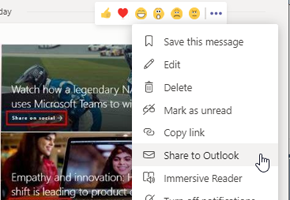
Dela en konversation från Teams
Att hitta en viss diskussion bland många i en aktiv kanal kan vara tidsödande men med funktionen Dela till Outlook finns det ett enkelt sätt att skicka konversationen som epost - så behöver inte alla andra också lägga tid på att leta.
Office 365 nyheter - januari 2020
Läs om bland annat läskvitton i Teams, bildbehandling i SharePoint och att agera på kommentarer direkt i Outlook

Why doesn't my colleague see your changes to the menu in SharePoint?
Have you ever updated a menu in SharePoint but found that colleagues still see the old menu? Then it's actually not the cache you should take a closer look at but the language

Nyheter i Office 365 under december 2019
Läs om att du nu kan ladda upp filer i Formsformulär, att det kommer nya möjligheter att ändra utseendet på text och ramar i SharePoint och att det blir en tydligare koppling mellan SharePoint-teamsiter och Teams
Nyheter i Office 365 under november 2019
Läs om hur du ska använda de nya privata kanalerna i Teams, att OneNote 2016 återuppstår och kommer ligga med i officeinstallationen och att du kan dela Whiteboard i Teams

Spara tid med smartare mötesbokningar
Spenderar du mer tid på att boka mötet än på att delta i själva mötet? FindTime kan hjälpa dig att lösa det problemet och du minskar också mängden epost
.jpeg)
7 praktiska nyheter från Ignite som du förmodligen missat
Har du hört om den nya delningsupplevelsen i Office 365? Eller om att du kan koppla ihop webbdelar för att göra din SharePoint-sida mer dynamisk och ta med dig mer av SharePoint in i Teams? Här har vi plockat några goda nyheter för dig som användare
Nyheter i Office 365 under oktober 2019
Läs om nya webbdelar i SharePoint, att du inte behöver lämna Teams för att starta synkning och om ditt personliga valv i OneDrive
Nyheter i Office 365 under september 2019
Visste du till exempel att det går att ställa in tysta timmar i Teams, förhandsgranska CAD-filer i SharePoint, skapa call-to-action länkar i SharePoint och flerspråkiga formulär i Microsoft Forms?

Funktionen du inte visste fanns i Teams som gör att du kan släppa jobbet efter arbetstid
Klockan är 22:30 en lördag och en ambitiös kollega skriver till dig i Teams, det plingar till i din telefon och du börjar ”smygjobba” en lördagskväll. Känner du igen dig? Det finns tack och lov en enkel lösning ett par klick bort.

Nyheter i Office 365 under juli-augusti 2019
Läs om nya funktioner i SharePoint, Designidéer i Power Point, delade uppgiftslistor i Outlook och To-Do och nyheter i Teams

What is Microsoft 365 and why is it interesting to me?
Learn about Office 365 and why it's interesting for you and your business. This article explains what Office 365 is and where it comes from. All in order to give you a better understanding of where the value lies for you.

Nyheter i Office 365 under juni 2019
Redigera en pdf-fil direkt i SharePoint, få Planner notifieringar och skicka extra viktiga meddelanden i Teams är några av nyheterna den här månaden.

3 smarta funktioner i OneNote
I OneNote kan du samla anteckningar, bilder, ljudklipp med mera. Vi har samlat några snabba tips som kan göra OneNote ännu mer användbart.

Nyheter i Office 365 under maj 2019
Läs om nya möjligheter i Stream, hantera delning direkt i OneDrive och kommande nya funktioner i Teams och SharePoint

Nyheter i Office 365 under april 2019
Läs till exempel om uppdateringar i OneDrive, att hantera appar i Teams och att koppla webparts och använda Document sets i SharePoint

Nyheter i office 365 under mars 2019
Läs om kopplingen mellan Outlook och Microsoft To-Do, den nya Yammer-fliken i Teams och att du snart kommer kunna bestämma ordningen på nyheterna i SharePoint.

Nyheter i Office 365 under februari 2019
Läs om övergången från Klassisk SharePoint till Modern, nya designmöjligheter i SharePoint, att det nu blir ännu enklare att spara direkt till molnet och mycket annat.

What is an intranet and why is it still a requirement for businesses?
Intranets are so much more than just a document management system today. In this article we go over where the concept comes from and what intranets are today.
Nyheter i Office 365 under januari 2019
Läs om nya möjligheter att anpassa utseendet på ditt intranät, nyheter i OneNote och om hur du skapar automatiska påminnelser i SharePoint.

Har du slängt fel fil och sedan tömt papperskorgen?
Få inte panik, det går (förmodligen) att få tillbaka filen.

Nyheter i Office 365 under december 2018
Läs om intressanta uppdateringar i SharePoint som påverkar både innehåll och utseende. Teams och OneDrive har också uppdaterats med nya funktioner som kan hjälpa dig att bli mer produktiv.

Office Lens vs OneDrive - vilken är bästa appen för att digitalisera whiteboardtavlan?
Händer det att du fotar av whiteboardtavlan innan den suddas ut? Det finns en smart funktion för att digitalisera foton och dokument - i både Office Lens och OneDrive, vi hjälper dig att välja

Nyheter i Office 365 under november 2018
Flera nya möjligheter att påverka utseendet på din SharePointsite, nya funktioner i Microsoft Teams och snart kommer en ny kolumntyp i SharePoint - Location.

Did you know that Office 365 can recommend files you need but didn't know they existed?
Find files you didn't know you needed before you saw them with the new smart “recommended” feature in Office 365.

Nyheter i Office 365 under Oktober 2018
Nu kan du dela kalendrar även i mobilen och använda bakgrundsbilder till sina anmälningsformulär. Microsoft rullar ut fler säkra sätt att logga in, med fingeravtrycksläsning och engångslösenord.

5 enkla misstag i Office 365 och SharePoint som irriterar dina användare
Visst känns det rätt surt att göra "enkla" misstag som påverkar funktionaliteten och skapar irritation. Misstag som lätt hade kunnat undvikas? Här delar vi med oss av några saker vi stött på, misstag som var enkla att göra och där man trodde man valde den bästa lösningen.
5 funktioner för dokumentbibliotek du kanske inte visste fanns i SharePoint
Dokumentbibliotek i SharePoint är superkraftiga och har många funktioner. Här listar vi 5 användbara funktioner som du kan börja använda direkt, out of the box, i Office 365 och SharePoint Online.
Nyheter i Office 365 under September 2018
Mycket nytt lanserades under Microsofts stora konferens Ignite under september. Helt ny sökfunktion som ska sträcka sig över allt från Word till SharePoint till Windows 10. Mega-meny och andra nyheter i SharePoint och Teams. Spännande månad!

Hubsiter i SharePoint förändrar hur du bygger intranät - Det här är vad du behöver veta
Hubsiter, vad är det och varför är det viktigt för mig? Vi går igenom hur du hanterar den moderna platta strukturen i SharePoint och vad du behöver tänka på för att lyckas.

Hur du enkelt visar ett diagram från Excel i SharePoint utan att visa hela arket #snabbguide
Att bara visa ett diagram från en Excelfil kan göra information mycket enklare att ta till sig för mottagare. I den här videon visar vi hur du visar enbart ett diagram från en Excelfil på en SharePoint-sida

Nyheter i Office 365 under Augusti 2018
Teams nu redo för prime time, efterfrågade funktioner i SharePoint rullar ut och mycket mer.

Nyheter i Office 365 under Juli 2018
Skrivbordskaos är nu ok, saker blir gratis och det analoga blir digitalt m.m. Läs mer om de senaste nyheterna i Office 365 här.