

SharePoint turned 25 and celebrated with a set of announcements around AI-powered site building and a visual refresh. Teams shipped a batch of February updates focused on trust indicators and meeting recaps, and Microsoft is retiring the old VDI optimization in favor of a new media engine that brings feature parity to virtual desktops.
AI-powered building and a fresh look for SharePoint
The biggest SharePoint news this month is what Microsoft calls “agentic building.” Instead of clicking through wizards to set up a site, page, list, or library, you can now describe what you want in plain language. The system supports multi-turn conversations, so you refine as you go rather than starting over when the first attempt misses the mark.

Alongside the AI building tools, SharePoint gets a visual refresh. The new experience organizes navigation around three scenarios: discovering what’s new, publishing content, and building solutions. Microsoft also announced updated content governance tools aimed at securing Copilot and agent deployments, with new controls in the SharePoint Admin Center and M365 Backup.
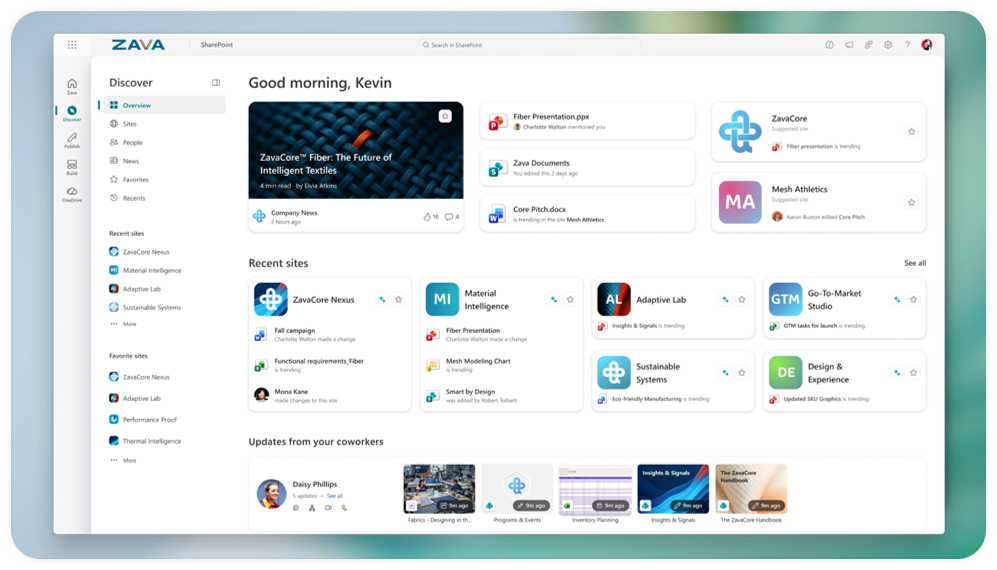
On the developer side, SharePoint Embedded (SPE) continues to gain traction. SPE is an API-only version of SharePoint delivered as an Azure service, aimed at ISVs and enterprise developers who want to embed M365 capabilities (Copilot, Purview, Office collaboration) into their own document management applications. Documents stay in the customer’s M365 tenant, which solves the data residency question that often blocks these integrations. LexisNexis and M-Files are among the partners building on SPE, with LexisNexis using it to modernize their document management platform.
Read more about agentic building in SharePoint | Read more about SharePoint Embedded
Teams feature updates for February
February’s Teams update includes a few features worth paying attention to. You can now forward up to five messages at once, which saves the tedious one-at-a-time routine when catching someone up on a conversation thread.

Trust Indicators are new visual badges that appear next to external users in chats and meetings. They classify contacts as familiar, unfamiliar, guest, verified, or unverified. This is a practical addition for organizations that deal with a lot of external collaboration and want users to have some quick context about who they’re talking to.
File search results now display in a grid view, Copilot meeting recaps support custom templates, and meeting recaps can show images that were shared during the session. The resizable gallery during screen sharing is a small but welcome fix for anyone who has wanted to see both the shared content and other participants at reasonable sizes. Group chat names can now be auto-generated by AI, which (I think) matters most for the people who never bother naming their group chats in the first place.

Read more on Microsoft Tech Community
New VDI optimization for Teams
Microsoft is retiring the legacy WebRTC-based VDI optimization for Teams and replacing it with a new architecture built on the SlimCore media engine. The practical difference: Teams on virtual desktops should now have feature parity with the native desktop client. Call setup is faster, diagnostics are better, and IT admins deal with less operational overhead. A new Best Practice Configurations dashboard in the Teams Admin Center helps track adoption of the new optimization across the organization.
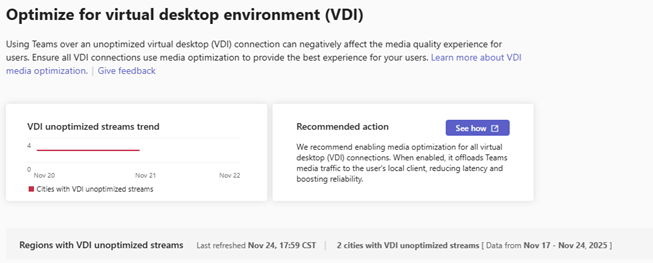
Separately, Teams VDI optimization reached general availability on Amazon WorkSpaces for Windows endpoints. Audio and video processing is offloaded to the endpoint device instead of the VM, which means HD audio and video quality without taxing the virtual machine. For organizations running Teams on Amazon WorkSpaces, this is the first time they get the same media experience as native desktop users.
Read more about the new VDI optimization | Read more about Teams on Amazon WorkSpaces
Sources
Introducing new agentic building in SharePoint and more updates
SharePoint Showcase: Using SharePoint Embedded to create AI-ready infrastructure
Turn your ECM/DMS into AI infrastructure with SharePoint Embedded
The next chapter of Microsoft Teams in virtualized environments
What’s New in Microsoft Teams: February 2026
Announcing general availability for Microsoft Teams optimization on Amazon WorkSpaces