

SharePoint is getting site campaigns for communications teams and HTML pages as a new page format. Copilot can work with PDFs, explain version changes and create more content directly in document libraries. Since our September 21 article, Copilot in SharePoint has also started rolling out broadly. Some features now use Copilot Credits in addition to the Copilot license. Teams news has its own article.
Group news into site campaigns
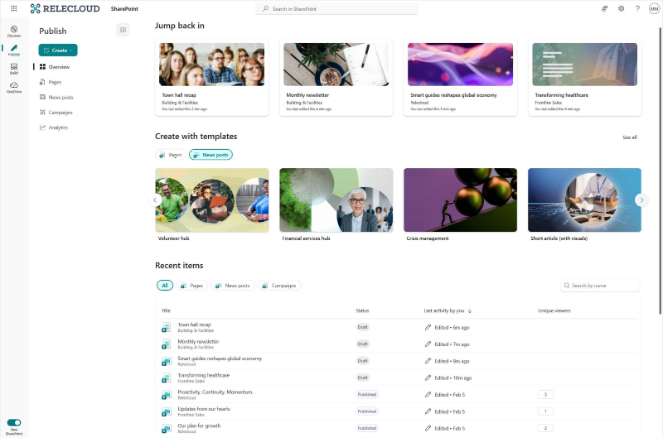
On October 26, Microsoft introduced site campaigns in SharePoint Publish. A campaign groups related news on an existing SharePoint site, such as information ahead of an office move or a series of leadership updates. Editors can create the campaign from Publish or the site’s settings and track the combined results of its news posts. Site owners and members can create campaigns; permissions follow the site. Campaigns support news posts, not regular pages. Read more on Microsoft Tech Community.
Site campaigns are available to SharePoint users. Multichannel publishing through Amplify and its associated analytics, however, require an assigned Amplify license, according to Microsoft’s instructions for Amplify from SharePoint. The standard Send as email feature does not count toward the campaign’s combined analytics; messages need to be sent through Amplify to be included.
The Viva Amplify app remains available, and the licensing model is unchanged. Site campaigns do not let you tailor content for each channel or write a separate campaign brief as you can in the Amplify app. The two campaign types also cannot share news and publications with each other. Linking a news post to a site campaign cannot be undone, according to the campaign documentation.
HTML pages offer an alternative to modern pages

HTML can now be stored as pages in the Site Pages library, alongside modern SharePoint pages. The October 22 announcement builds on the HTML reports available previously: HTML pages can be saved as drafts, published and shared, and have their own analytics. They could suit a project page with charts or an onboarding guide with a different layout from the usual web parts. Some capabilities are still rolling out through the Frontier program. Read more on Microsoft Tech Community.
Copilot can create a page from a prompt and attached files. You can also upload an HTML file or a folder containing its images and other resources. Uploading, direct text editing, publishing and reading require no Copilot license, only the appropriate SharePoint permissions. Creating or changing a page through Copilot requires Microsoft 365 Copilot. HTML is enabled by default wherever the feature is available; the site owner can disable it in Site Pages, but there is no equivalent organization-wide setting.
The page format does not replace all the usual editing features. According to Microsoft’s detailed feature table, it lacks co-authoring, scheduled publishing, page templates and the option to make a page a news post, among other features. HTML pages also cannot be distributed to Teams and Viva Engage through Amplify.
Pages can display data from SharePoint lists and Excel, but they do not allow unrestricted integration with other systems. Content runs in an isolated iframe that blocks arbitrary data fetching and outbound API calls. Uploaded HTML does not automatically adopt the site’s branding, though Copilot can help adapt it.
Copilot works with PDFs and version history
The October update for Copilot in SharePoint adds support for working with individual pages and sections in PDFs. Copilot can extract the pricing section from tender documents, insert an appendix, reorder pages or split a larger document into several files. This is included in the Microsoft 365 Copilot license.
Copilot can also read version history, summarize changes and restore an earlier file version. A document owner could, for example, ask for a comparison of the two latest versions before approving a restore. This is also included in the license.
You can also create a summary or HTML report and send the content directly in an email rather than as an attachment. Copilot shows the message before sending and can interpret recipients such as “my manager”. The chat pane gets suggested follow-up questions and quicker access to available skills.
Faster metadata processing, image editing and analytics use Credits
Copilot in SharePoint began rolling out for general availability on September 30. A hybrid model was introduced at the same time: regular questions, content work, reusable skills and the existing metadata feature remain included in Microsoft 365 Copilot. Larger agent tasks and some advanced features use Copilot Credits. Read more in Microsoft’s September 25 launch announcement.
Advanced Autofill uses Credits for a faster processing queue when adding metadata to documents. According to Microsoft, most files take a few minutes, but processing can take around an hour under heavy load. The site administrator needs to enable sharing their Credits with the site. Standard processing under the user’s license remains available if there are no Credits. The autofill documentation states that only English-language files can be processed, although instructions can be written in other supported languages.
Creating and editing images directly in libraries requires both a Copilot license and Credits. The same applies when site owners ask Copilot to compile analytics about pages, news and documents into a custom report. Standard page analytics are not subject to this extra charge. Administrators control access and consumption limits through Microsoft 365 cost management.
Workflows get rich cards in Teams

September brought notifications from SharePoint to Teams. October adds formatted Adaptive Cards with selected metadata fields and buttons linking back to the file. A contract whose status changes to active could, for example, generate a card with its contract type, status and link in the appropriate channel. The editor describes the content and conditions to Copilot. The feature is included in Microsoft 365 Copilot and requires access to Power Automate.
The same monthly update describes plugins that let Copilot in SharePoint read and write data in other business systems. This could mean comparing a report in SharePoint with CRM data and creating follow-up tasks. IT controls which plugins users can use, and bulk actions require human approval. Having the Copilot feature included in the license does not grant users new permissions in connected systems. Read more on Microsoft Tech Community.
Knowledge bases for people and agents in Frontier preview
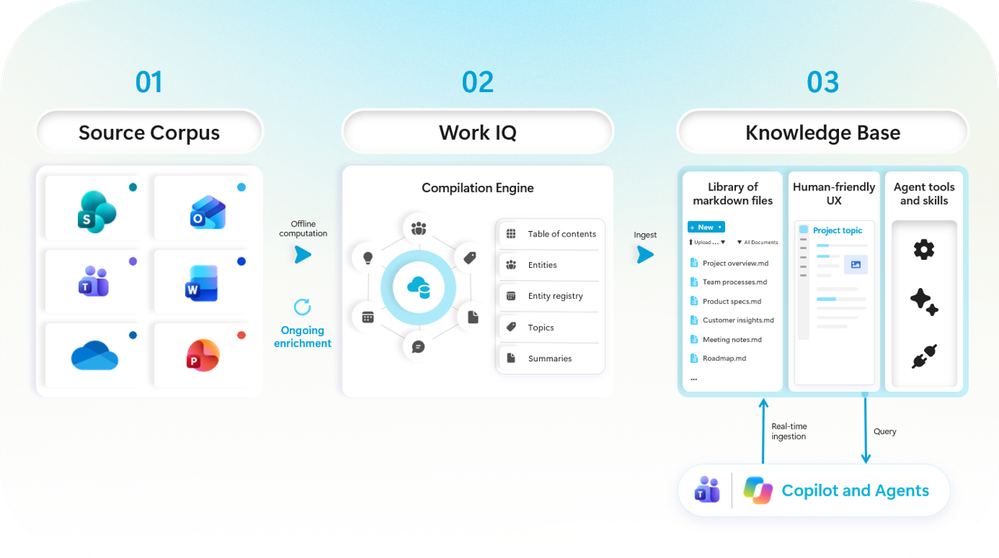
Microsoft introduced SharePoint Knowledge Base on October 14. The feature collects a team’s guidance, decisions and procedures as linked Markdown pages. Copilot can turn source material into a knowledge base that both colleagues and agents can use, for example when onboarding new employees. The feature is rolling out in Frontier preview; the Autopilot integration also requires separate access to Autopilot. Read more on Microsoft Tech Community.
Having Copilot create, update or check the knowledge base uses Credits and requires usage-based billing to be enabled. According to the support documentation, asking questions about the content is included in Microsoft 365 Copilot, while manual reading and editing do not require Copilot. Changes to sources do not update the knowledge base automatically. Ongoing automatic maintenance is on Microsoft’s roadmap, not in the current preview.
Knowledge base pages inherit the site’s permissions, not those of the source files. Content taken from a file may therefore become readable by people who cannot access the original. The source file’s sensitivity label is not carried over either. HR material and customer contracts may therefore need a knowledge base with more restricted permissions.
More tools for governance and AI search
Microsoft’s October announcements also cover SharePoint Admin Agent and Catalog management. Administrators can ask about overshared sites, storage and inactive content, while the catalog groups sites by existing metadata, such as department. Admin Agent requires SharePoint Advanced Management and the SharePoint Advanced Management Administrator role. Catalog management is also part of Advanced Management. See Admin Agent and Catalog management.
Copilot Search as the default search for Copilot-licensed users in SharePoint and OneDrive is rolling out in Frontier public, according to the September announcement. Visual components built with SharePoint Framework in Copilot chat are in public preview. SharePoint tools through Work IQ and broader integrations with Copilot Studio have been announced for a future rollout. Read more on Microsoft Tech Community.
Sources
SharePoint Publish and site campaigns, October 26. Get started with Publish, manage campaigns and Amplify from SharePoint: licensing and distribution.
HTML pages in SharePoint, October 22 and HTML page features, licensing and limitations.
Team knowledge bases, published October 14 and updated October 15 and SharePoint Knowledge Base: requirements and limitations.
What’s new in Copilot in SharePoint, October 1, autofill and language support and usage-based billing.
General availability and hybrid model for Copilot in SharePoint, September 25.