

SharePoint is getting shared news discussions with Viva Engage, more editing tools and new Copilot features for documents and workflows. Teams brings meeting recaps together and tightens control over external meeting bots. Legacy SharePoint alerts are being retired and Teams device management is moving to another portal.
Here we cover updates for Swedish companies using SharePoint intranets and Teams since our previous article on 27 June (in Swedish).
Check that old SharePoint alerts have been replaced
Microsoft is retiring SharePoint Alerts from July 2026. According to the timeline, existing alerts stop working at that point and can no longer be extended. This applies to the legacy feature for tracking changes in lists and libraries.
If you use these alerts for the staff handbook or project libraries, they need replacing. Microsoft points to SharePoint Rules and Power Automate, with notification templates in Workflows. Make a test change and check that the right people receive the notification. Read more on Microsoft Tech Community.
Classic SharePoint pages become read-only in 2028
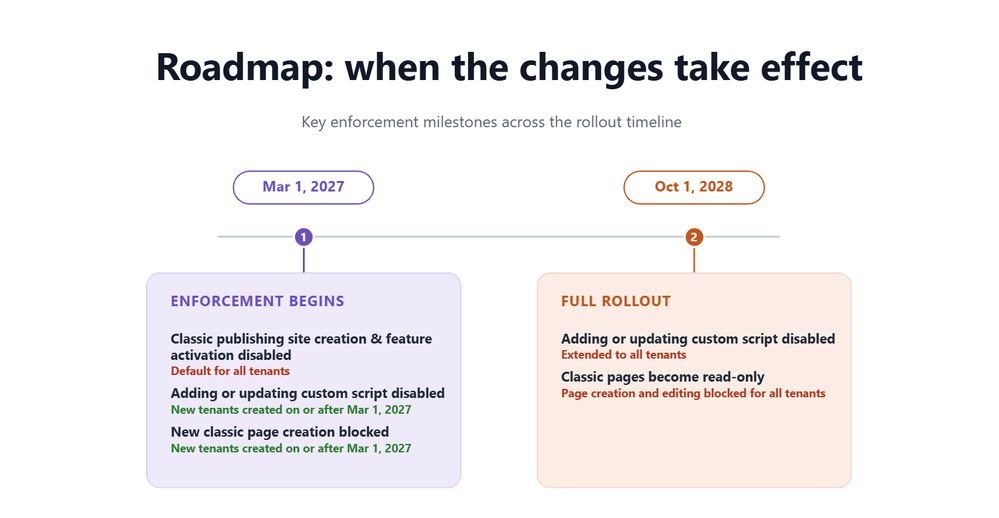
On 31 August, Microsoft announced new restrictions for classic pages in SharePoint Online. From 1 March 2027, creating new classic publishing sites and enabling the publishing feature will be blocked for all organisations. Microsoft 365 environments created from that date will also block new classic pages and the addition or updating of custom scripts.
From 1 October 2028, user-created classic pages will become read-only in existing environments too. This includes wiki, web part, blog and publishing pages, as well as custom ASPX pages. The content will remain and the pages will still be readable.
Modern pages and classic list and library views are not part of the read-only change. Embedded scripts are subject to the script restrictions. Take stock of the classic pages you need to keep editing after October 2028. Read more on Microsoft Tech Community and in Microsoft’s detailed timeline.
SharePoint and Viva Engage get shared news discussions
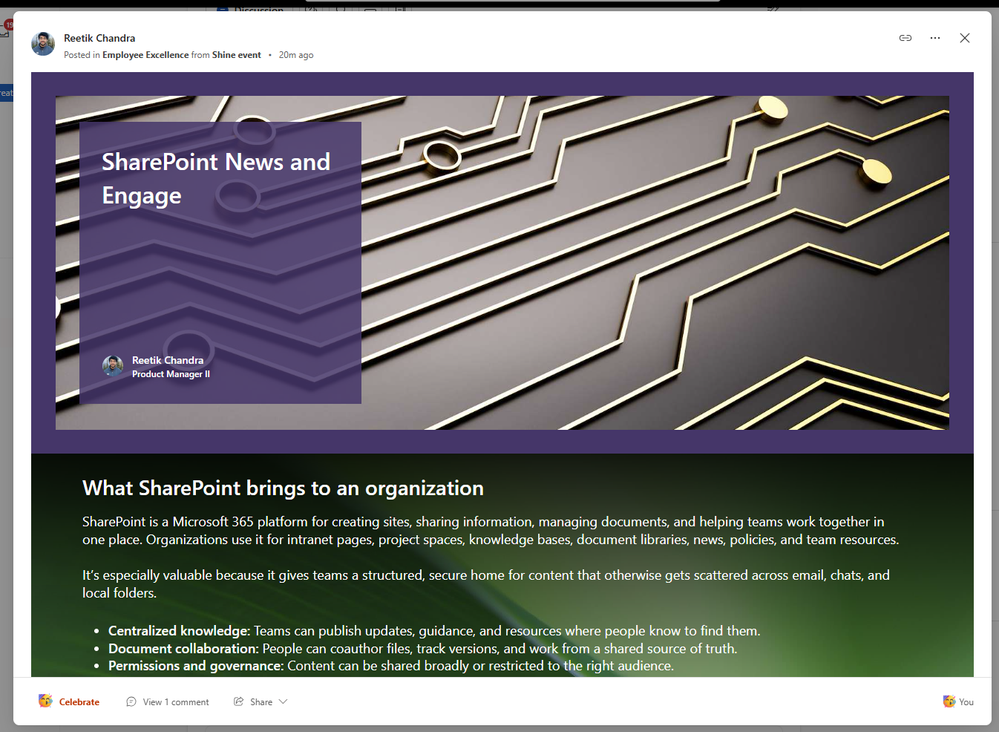
SharePoint News can now be cross-posted to a storyline or community in Viva Engage. The reader opens the original SharePoint page with its layout and web parts intact. Comments, replies and reactions sync between SharePoint and Engage, rather than becoming two separate discussions.
Select Engage in the panel shown after publishing a news post, or use Promote/Amplify on an existing post. Cross-posting requires no separate Viva Communications and Communities licence. The analytics available depend on your licence. Read more on Microsoft Tech Community.
Over the summer, Microsoft also described new tools for home sites: a resources web part, customisation of the SharePoint app in Teams and new options for announcements and news layouts. The July roundup also covers how material from Copilot Pages can become a SharePoint news post. AI-generated audio summaries of SharePoint news in Teams are still rolling out according to Microsoft’s roadmap. Read more on Microsoft Tech Community and follow the rollout of audio summaries.
Flexible sections become easier to edit
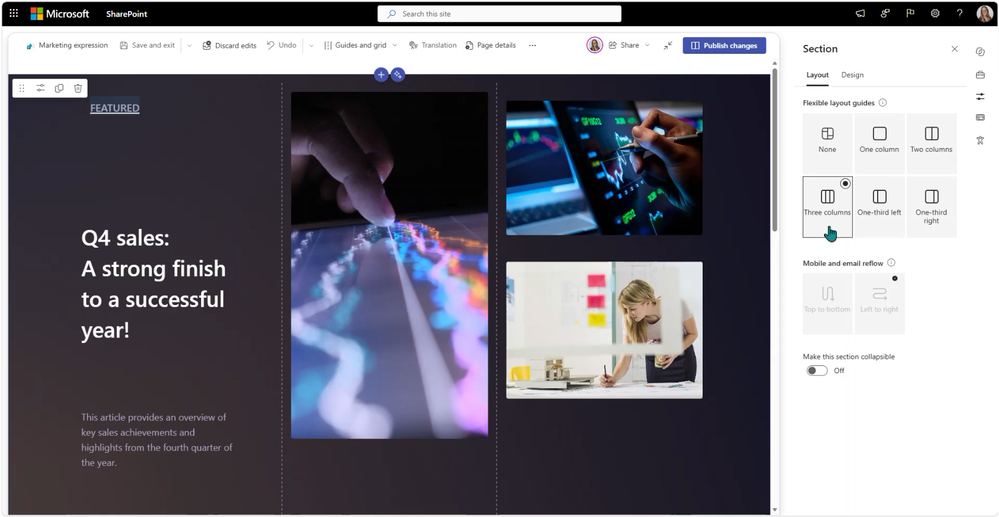
Flexible sections are getting visual column guides and a grid that can stay visible during editing. A standard section can also be converted into a flexible section while preserving its existing column structure and web part positions. The update was published on 1 September.
Editors no longer need to rebuild the section from scratch. Preview the layout on mobile and in email before reusing it. Read more on Microsoft Tech Community.
Copilot creates documents, reports and workflows in SharePoint
The July update describes how Copilot can create Word, Excel and PowerPoint files from SharePoint content, organise files and folders, and help with sharing. You can also describe approval workflows, email rules and Quick Steps in plain text and let Copilot help with the settings. Review the suggestions before files are moved or shared. Read more on Microsoft Tech Community.
August added interactive HTML reports linked to SharePoint lists. The report loads the list’s current data each time it is opened. A button on a SharePoint page can also launch a prepared Copilot prompt, for example for a project overview. Read more on Microsoft Tech Community.
The September update adds Teams notifications when files or metadata change, workflows that send documents for approval, and support for analysing images in a document library. Microsoft has also written instructions for AI tools that create HTML for SharePoint’s sandbox. Copilot in SharePoint requires a Microsoft 365 Copilot licence. Read more on Microsoft Tech Community.
Reuse instructions and test the result
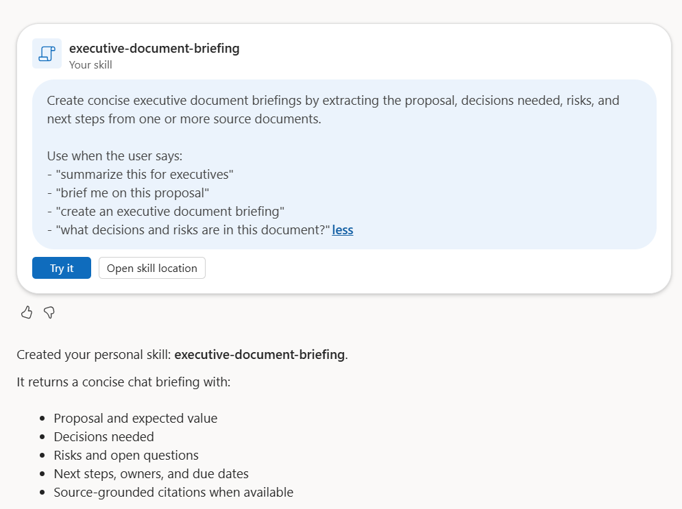
Copilot skills are instructions you can reuse to write reports or review documents, for example. The July update added support for creating and finding them through /Skills. September adds personal skills that can be used across multiple SharePoint sites, along with support for improving them through tests and evaluations.
An intranet editor could save instructions for writing departmental news and try them on a few existing texts. Read more on Microsoft Tech Community.
On Microsoft’s roadmap
Microsoft plans to move the management of multiple home sites to the SharePoint admin center. SharePoint links in Teams for iOS and Android will also open in the SharePoint app when it is available. Both features are marked In development on 8 September, as are PDF thumbnails and comments directly in Markdown files. See the entries in Microsoft’s roadmap for home sites, mobile links, PDF thumbnails and Markdown comments.
Microsoft’s roadmap also includes recipient groups in eSignature, where one of several people will be able to sign for the group, and a Power Automate action that creates documents from forms and templates. The action is called Generate document from form (Preview), with general availability planned for October 2026. Agent Access Insights is due to get a heatmap of agent access to SharePoint and OneDrive. These features are also in development or preview. See eSignature, document generation and Agent Access Insights.
Teams makes it easier to find files and return to work
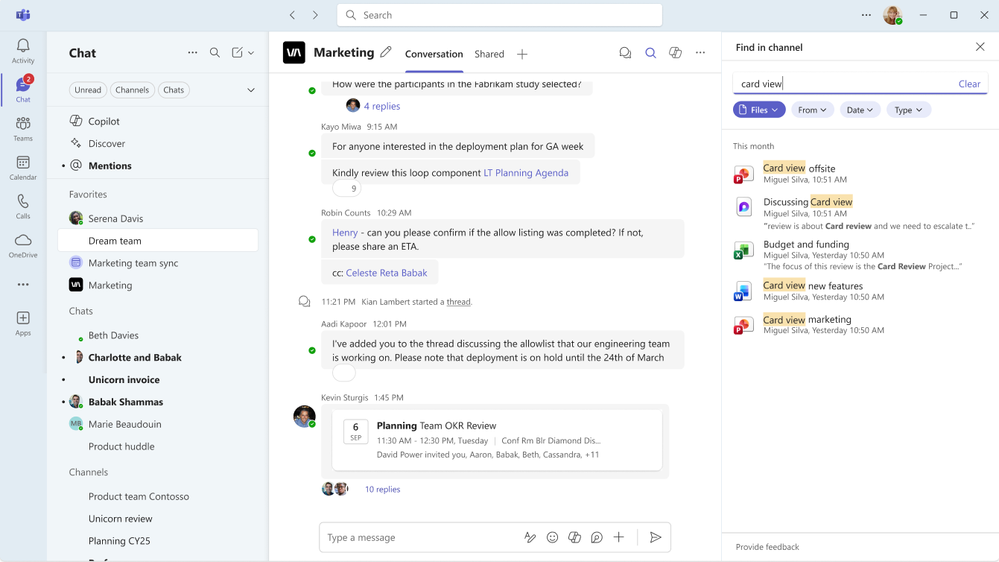
The June Teams roundup, published on 30 June, describes expanded file search in chats and channels. Channel search also includes uploaded files that are not in a message, with filters for file type, sender and date. Teams can also preserve the selected tab and side panel when you leave a conversation and return shortly afterwards.
Muted chats and meeting chats can be grouped into their own sections. It is easier to track downloads and preview PowerPoint and Excel files on mobile. More apps can be used in private and shared channels, where the app and your organisation’s policy allow it. July added access to Viva Engage communities directly in Teams and a clearer way to request access to blocked apps and agents. Read more on Microsoft Tech Community in the June roundup and July roundup.
Meeting Recaps brings meeting summaries together
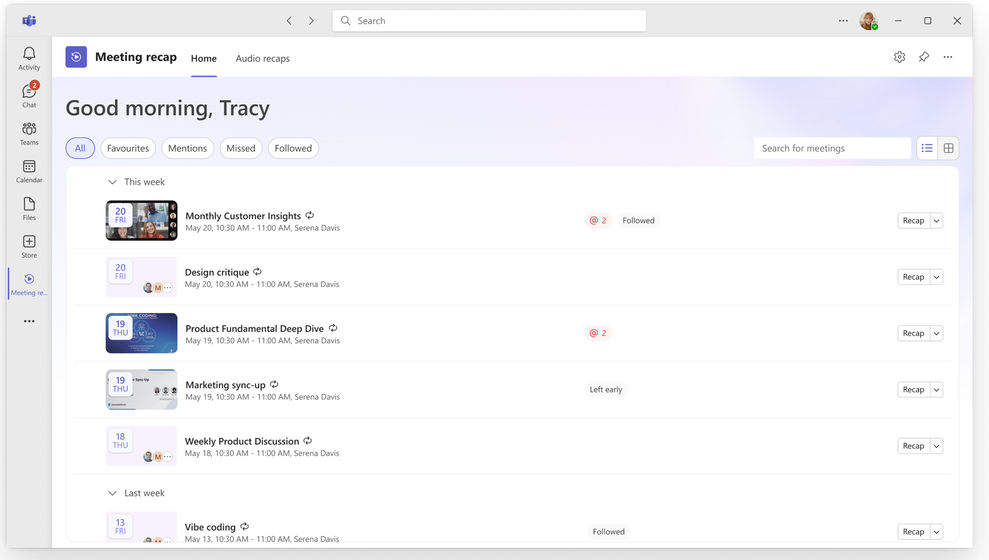
Meeting Recaps brings together summaries of meetings from the past 30 days in an app in the Teams sidebar. Filters help users find, for example, meetings where they were mentioned. Read more on Microsoft Tech Community.
Intelligent recaps require Microsoft 365 Copilot or Teams Premium, while audio and video recaps require Copilot. Audio recap is still in preview according to Microsoft’s documentation. See the app’s requirements and details on intelligent recap.
In August, Microsoft published an overview of Copilot for meeting preparation, scheduling and follow-up. It includes Facilitator, whose task management is still in preview. Interpreter can translate speech in meetings, but does not yet support Swedish. Read Microsoft’s meeting overview, Facilitator’s requirements and Interpreter’s language support.
Suspected meeting bots must wait in the lobby
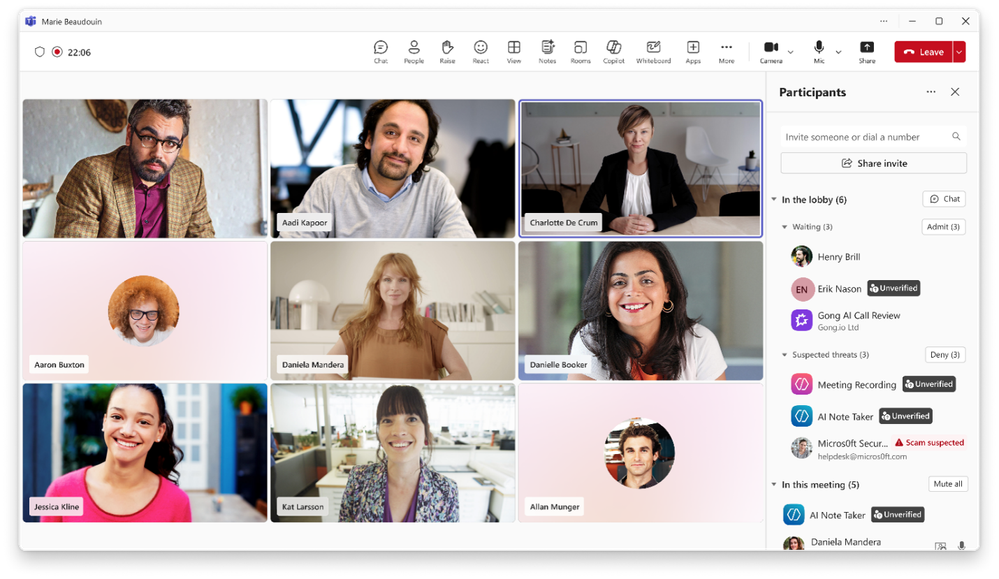
A new Teams policy places suspected external bots in the lobby, where someone must approve their admission. This also applies when regular participants are allowed to bypass the lobby. The bots appear in a separate group and require an extra confirmation before admission.
Check the Manage external bots and their access to meetings policy and who is allowed to admit participants. Microsoft is also exploring approved-bot lists, blocking all external bots and dedicated bot reports. These features are not yet included. Read more on Microsoft Tech Community.
The Teams admin center gets a Security Detection Report. On mobile, Teams can warn about suspected impersonation, and users can report suspicious calls. Built-in agents such as Facilitator get their own administration area. Organisations with virtual desktops should check the new Teams optimisations for Omnissa on Windows and for AVD/Windows 365 on macOS. Read more on Microsoft Tech Community.
Scheduling and follow-up for staff without a dedicated computer
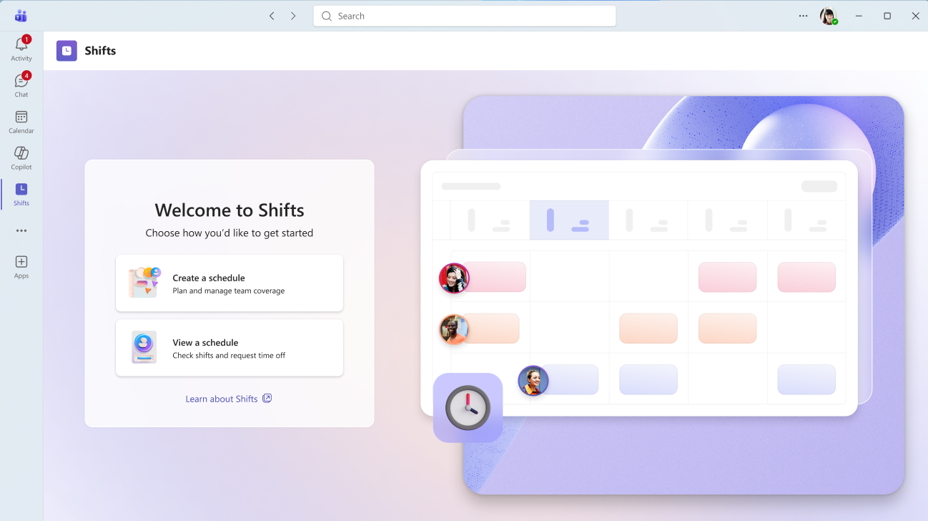
Summer updates to Shifts include help with assigning open shifts based on rules, moving shifts with drag and drop, selecting multiple shifts and planning two weeks at a time. July added simpler onboarding and recovery of deleted schedules. Read more on Microsoft Tech Community in the June roundup and July roundup.
Frontline Agent gets Follow Up to collect responses from up to 20 people and Site Walkthrough for voice-based walkthroughs that become structured reports. These features require a Microsoft Copilot licence according to Microsoft’s setup guide. Check language support and test with real work tasks before replacing an existing routine.
Swedish voicemail transcription and a new portal for Teams devices
Voicemail transcription is getting support for Swedish, along with automatic language detection and more languages. Teams Phone on iOS gains support for multiple numbers for the same user, up to ten according to the July roundup, and the Teams mobile app gets a dedicated speed dial tab. Read more on Microsoft Tech Community in the June roundup and July roundup.
Teams device management is moving from the Teams admin center to the Teams Rooms Pro Management portal. The move starts in the first week of September and is expected to finish by the end of the month. Check administrator access, device connectivity and existing configuration profiles. See Microsoft’s migration guide.
In Teams Rooms, you can now change settings for multiple Android devices at once and sync settings between the device and portal. Windows gets passwordless sign-in with Entra resource accounts. Features and licence requirements differ between platforms. Facilitator’s new room features and IntelliFrame name labels from the June roundup are in preview. Read more on Microsoft Tech Community.
On 3 September, Microsoft confirmed it will continue developing Teams Rooms for both Windows and Android. New Android devices certified for Teams must have Microsoft Device Ecosystem Platform, MDEP. Existing certified devices will continue to receive Teams updates until their certification and support end dates. Check the manufacturer’s support dates when you next buy devices. Read more on Microsoft Tech Community.
For development teams: GitHub Copilot from a Teams conversation
GitHub Copilot in Teams launched in public preview on 21 August. With the GitHub app in the conversation, the team can mention Copilot and ask for a code change or tests. Copilot can then create a pull request. GitHub permissions and code review requirements still apply.
The feature requires a paid GitHub Copilot plan and the right settings and permissions in GitHub. A Microsoft 365 Copilot licence is not enough. The entire conversation thread is used as context and saved in the material the agent creates. Avoid threads with information that should not be sent to GitHub. Read more on Microsoft Tech Community and check GitHub’s setup requirements.
Sources
Classic SharePoint experiences: Microsoft’s announcement and detailed timeline
SharePoint News and Viva Engage
SharePoint’s July roundup and home sites
Copilot in SharePoint: July, August and September
Microsoft Teams: June and July
Copilot before, during and after meetings
Meeting Recaps app, intelligent recap, Facilitator and Interpreter
Protection against external meeting bots
Frontline Agent: setup and licensing
Teams devices moving to Pro Management
Teams Rooms: Windows, Android and support
GitHub Copilot in Teams and GitHub’s setup requirements
Microsoft 365 roadmap: audio news 562018, home sites 567887, mobile links 567314, PDF thumbnails 566696, Markdown 566202, eSignature 560822, document generation 561026 and Agent Access Insights 565027. Status checked on 8 September 2026.